create_tensorboard_visualizations
- ampligraph.utils.create_tensorboard_visualizations(model, loc, entities_subset='all', labels=None, write_metadata=True, export_tsv_embeddings=True)
Export embeddings to Tensorboard.
This function exports embeddings to disk in a format used by TensorBoard and TensorBoard Embedding Projector. The function exports:
A number of checkpoint and graph embedding files in the provided location that will allow the visualization of the embeddings using Tensorboard. This is generally for use with a local Tensorboard instance.
A tab-separated file of embeddings named embeddings_projector.tsv. This is generally used to visualize embeddings by uploading to TensorBoard Embedding Projector.
- Embeddings metadata (i.e., the embedding labels from the original knowledge graph) saved to in a file named
metadata.tsv`. Such file can be used in TensorBoard or uploaded to TensorBoard Embedding Projector.
The content of
locwill look like:tensorboard_files/ ├── checkpoint ├── embeddings_projector.tsv ├── graph_embedding.ckpt.data-00000-of-00001 ├── graph_embedding.ckpt.index ├── graph_embedding.ckpt.meta ├── metadata.tsv └── projector_config.pbtxtNote
A TensorBoard guide is available here.
Note
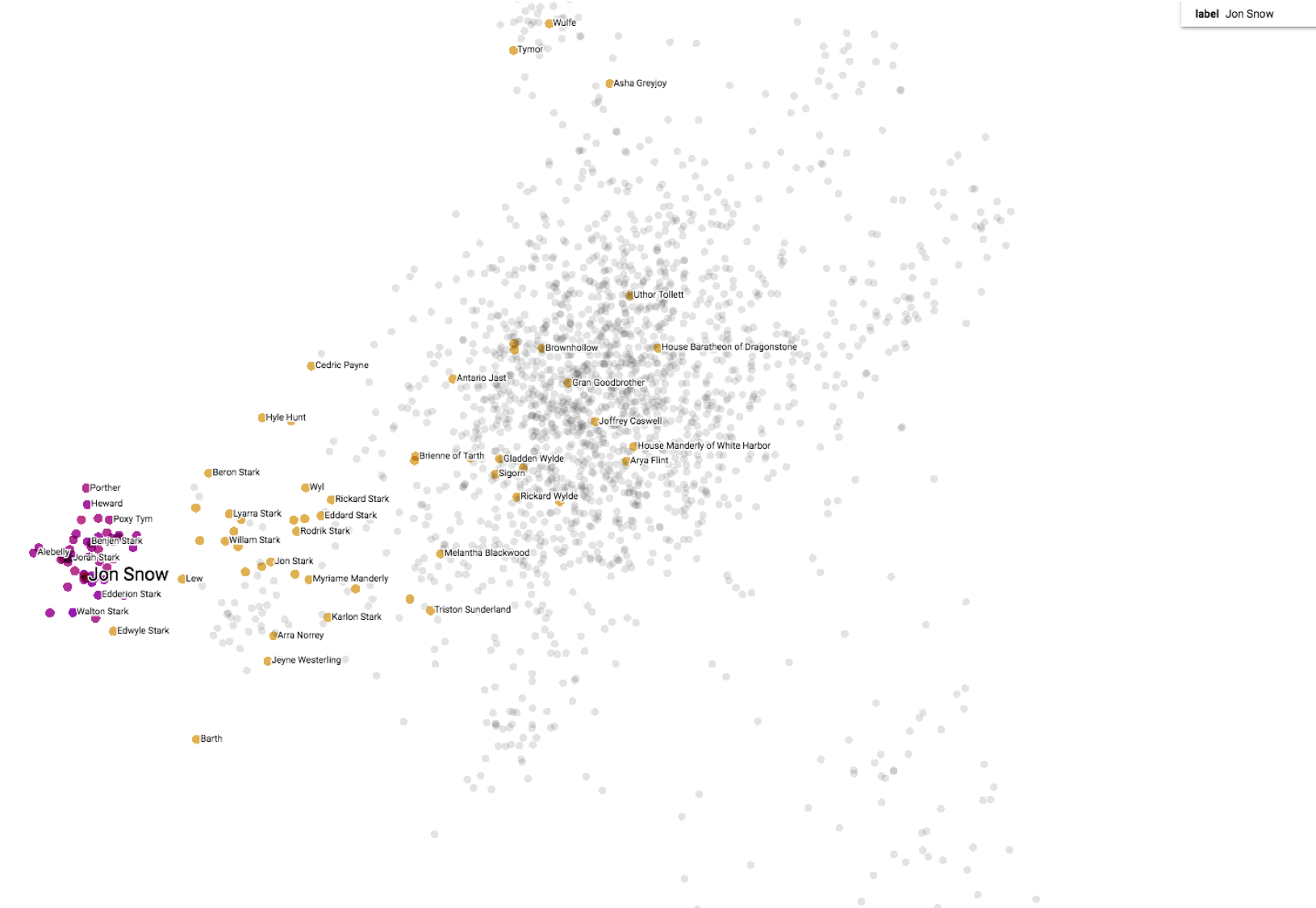
Uploading embeddings_projector.tsv and metadata.tsv to TensorBoard Embedding Projector will give a result similar to the picture below:
Example
>>> # create model and compile using user defined optimizer settings and user defined settings of an existing loss
>>> from ampligraph.latent_features import ScoringBasedEmbeddingModel
>>> from ampligraph.latent_features.loss_functions import SelfAdversarialLoss
>>> import tensorflow as tf
>>> optim = tf.optimizers.Adam(learning_rate=0.01)
>>> loss = SelfAdversarialLoss({'margin': 0.1, 'alpha': 5, 'reduction': 'sum'})
>>> model = ScoringBasedEmbeddingModel(eta=5,
>>>                                    k=300,
>>>                                    scoring_type='ComplEx',
>>>                                    seed=0)
>>> model.compile(optimizer=optim, loss=loss)
>>> model.fit('./fb15k-237/train.txt',
>>>           batch_size=10000,
>>>           epochs=5)
Epoch 1/5
29/29 [==============================] - 2s 67ms/step - loss: 13101.9443
Epoch 2/5
29/29 [==============================] - 1s 20ms/step - loss: 11907.5771
Epoch 3/5
29/29 [==============================] - 1s 21ms/step - loss: 10890.3447
Epoch 4/5
29/29 [==============================] - 1s 20ms/step - loss: 9520.3994
Epoch 5/5
29/29 [==============================] - 1s 20ms/step - loss: 8314.7529
>>> from ampligraph.utils import create_tensorboard_visualizations
>>> create_tensorboard_visualizations(model,
                                      entities_subset='all',
                                      loc = './full_embeddings_vis')
>>> # On terminal run: tensorboard --logdir='./full_embeddings_vis' --port=8891
>>> # Open the browser and go to the following URL: http://127.0.0.1:8891/#projector
- Parameters:
model (EmbeddingModel) – A trained neural knowledge graph embedding model, the model must be an instance of TransE, DistMult, ComplEx, or HolE.
loc (str) – Directory where the files are written.
entities_subset (list) – List of entities whose embeddings have to be visualized.
labels (pd.DataFrame) – Label(s) for each embedding point in the Tensorboard visualization. Default behaviour is to use the embedding labels included in the model.
export_tsv_embeddings (bool) –
If True (default), will generate a tab-separated file of embeddings at the given path. This is generally used to visualize embeddings by uploading to TensorBoard Embedding Projector.
write_metadata (bool) – If True (default), will write a file named ‘metadata.tsv’ in the same directory as path.